@2x.png?width=800&height=300&name=Nookal%20in%20Capsule%20(RGB)@2x.png)



Are you tired of spending your evenings catching up on clinical notes?
It's a familiar situation for many allied health professionals. Your appointments fill the day, but there's not always enough time to complete the documentation.
The consultation is over. Your patient is getting ready to leave, and your next appointment is coming up. But there's still one thing to do: finish the clinical notes.
One appointment becomes another, and before you know it, you're catching up on documentation after hours.
Clinical notes are an essential part of patient care, but finding time to write them alongside a full schedule of appointments, treatment plans and everything else that needs attention can be challenging.
That's where AI can help.
Nookal offers AI tools to support clinical documentation, from voice-to-text technology and AI Scribe to clinical note summaries. JAN (Just Ask Nookal), Nookal's AI assistant, provides another way to get help with documentation by making requests using text or voice.
Rather than starting every note from scratch, you can use these tools to help capture, organise or summarise information, leaving you to review the content and ensure the final record is accurate.
Here's how each can help, and where JAN fits into the process.
Three Ways AI Can Help with Clinical Notes
Not all AI documentation tools do the same thing. Understanding the differences can help you identify where they may be useful in your workflow.
1. Voice to Text: Spend Less Time Typing
Typing isn't always the easiest way to document information, particularly when you're working between appointments or need to capture details quickly.
Voice-to-text technology converts spoken words into written text, providing an alternative to typing information manually.
Real-time voice-to-text functionality can help capture information as you speak, giving you text to work with rather than having to type everything out later.
The resulting text may still need correcting or organising before it's suitable for a clinical record. As with any documentation method, accuracy matters.
2. AI Scribe: Turn Consultations into Draft Notes
AI Scribe tools use AI to listen to recorded consultations and generate meaningful draft clinical notes. Rather than relying entirely on memory after an appointment, you have a starting point based on the conversation, with relevant information organised into a clinical note.
This can reduce the amount of writing required, leaving you with a draft to review, edit and approve.
Before using one, check how audio and patient information are processed, and follow the consent, privacy and professional requirements that apply to your practice.
3. Clinical Note Summaries: Bring Important Information Together
Clinical records can become lengthy, particularly when you're working with patients who have attended multiple appointments.
Clinical note summaries can help condense relevant information into a more manageable format, making it easier to review key details when preparing for an appointment or looking back at a patient's history.
A summary can help you locate the information you need without having to work through every entry individually. However, it shouldn't replace reviewing the original records when the full detail is important.
Always check that a summary is accurate and includes the information relevant to your clinical decisions.
How JAN Can Help with Clinical Documentation
Capturing information is one part of the process. Turning it into a clear, useful clinical note is another.
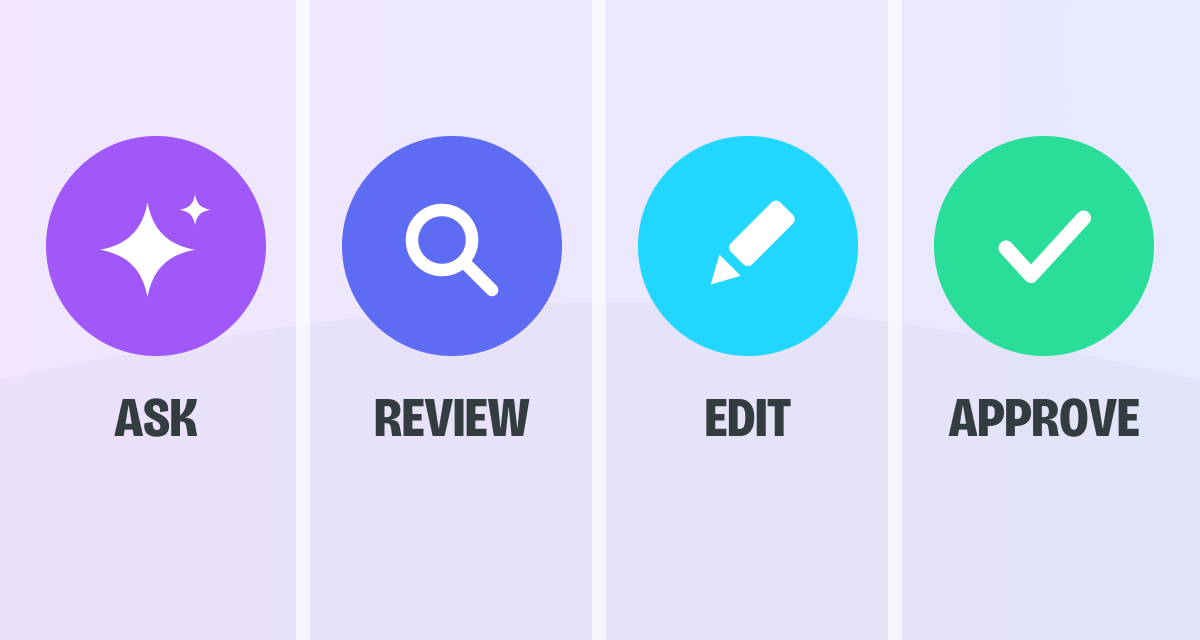
JAN, Nookal's AI assistant, can listen to and record your consultation, then draft a clinical note directly into your clinical note template for you to review and approve.
Here's how that process works:
- Turn on JAN before the consultation. JAN listens to and records the consultation as it takes place.
- Review the draft. JAN uses the recorded consultation to prepare a draft in your clinical note template.
- Make any necessary changes. Correct errors, clarify wording and add missing information.
- Approve the final note. Once you're satisfied that the record is accurate and complete, approve it through your usual workflow.
JAN helps reduce the work involved in preparing clinical notes from scratch, while keeping the final record and clinical decisions under your control.
What Should a Clinical Note Include?
A clinical note should capture the important details of an appointment so you can refer back to them later. The specific information required will depend on the patient, the consultation and your clinical documentation requirements.
Depending on the appointment, a note may include:
- Presenting concerns: Why the patient attended and what you discussed.
- Assessment and findings: Relevant observations and information gathered during the consultation.
- Treatment provided: The interventions, exercises or other treatment carried out.
- Plans and follow-up: Agreed next steps, recommendations or plans for future care.
AI can help capture, organise or summarise available information, but it can't reliably supply details it hasn't been given.
Before approving a note, check that it includes the information required for that appointment and accurately reflects your clinical assessment and the care provided.
Before You Approve: What to Check
AI-generated documentation can provide a useful starting point, but because AI can make mistakes and is not a trained professional the final clinical record still needs your attention.
Before approving a note, check:
- Accuracy: Do the details match what you discussed, observed and did during the appointment?
- Completeness: Are the relevant findings, treatment details and next steps included?
- Clinical meaning: Does the note reflect your assessment and judgement?
- Clarity: Is the wording clear and appropriate for the patient's record?
- Missing or unclear information: Has anything important been left out, or has anything been included that you can't verify?
Make any necessary changes before approving the note. If something is missing or unclear, check the information rather than assuming the draft is correct.
AI can help with the documentation process, but your knowledge and judgement are essential to ensuring the finished record accurately reflects the consultation.
Less Time Writing. More Time for What Comes Next.
Clinical documentation is necessary, but it doesn't have to mean doing every task manually.
Voice to text can reduce the need for typing. AI Scribe can help capture spoken information during a consultation, while clinical note summaries can make relevant information easier to review. JAN offers another way to request assistance with preparing documentation.
How much time these tools save will depend on your workflow, the complexity of the consultation and how much editing the content requires. They're not a guarantee that every note will be completed instantly, but they can help make documentation more manageable.
And with JAN built into Nookal, you can request assistance within the practice management system you already use.
AI Can Help with the Draft. You Own the Final Record.
Clinical notes are an important part of patient care. Using AI to help prepare them doesn't change the need for accurate documentation or professional judgement.
Whether you're working with transcribed information, a summary or a draft prepared with JAN, you remain responsible for checking the content and ensuring the final record meets your clinical requirements.
The goal is straightforward: spend less time getting the words down and keep your attention on the details that matter.
Want to See JAN in Action?
From drafting clinical notes to helping with other administrative tasks, JAN gives you another way to get things done within Nookal.
See how it works in practice and explore how JAN could fit into your own workflows.
%20(1).png?width=1200&height=640&name=Choose%20Nokal%20(Last%20image)%20(1).png)